Lennox Home
- 4.3
- Rating
- 100.00K
- Installs
- Free
- Price

 Analysis by App-foxy
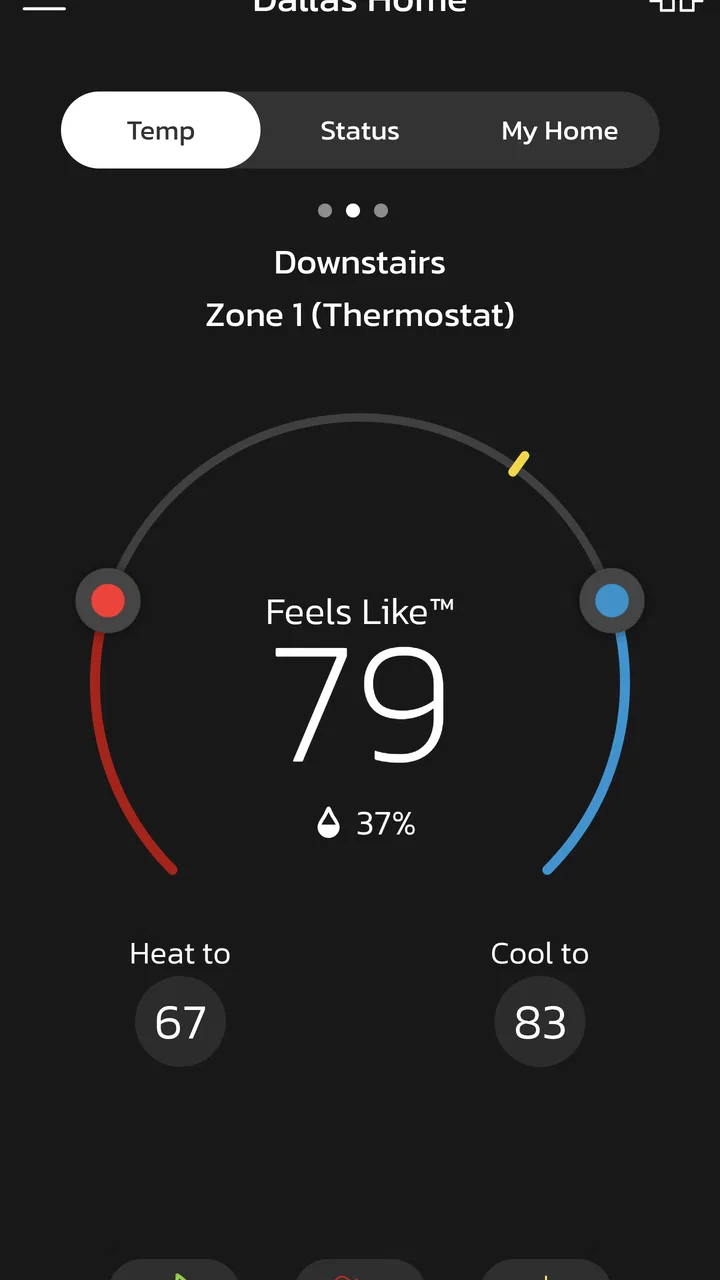
When I use Lennox Home, I think of it less as a general lifestyle app and more as a remote control for a Lennox smart-home setup. Its central promise is simple: I can check and manage my Lennox Smart Thermostat and connected accessories without being in the house. That single capability is what makes the app useful, especially when my routine changes during the day.
The app is free, aimed at everyone, and developed by Lennox International Inc. It belongs to the lifestyle category, but its practical value is very specific: it connects everyday comfort with the phone I already carry. I would recommend it to someone who owns compatible Lennox equipment and wants more control than a wall-mounted thermostat can provide. I would not choose it simply because I want a standalone temperature app.
Remote thermostat control is the real reason to install it
The strongest part of Lennox Home is the ability to interact with the thermostat while I am away. That changes the experience from making one adjustment at home to managing the heating or cooling situation around my schedule. I can use the app when plans shift, when I am returning earlier than expected, or when I realize I left the home set differently from how I intended.
You May Also Like

 AccuWeather: Weather Radar
AccuWeather Review: A Quick, Clear Forecast for Everyday Decisions
For everyday plans, the best forecast is the one you can understand quickly. AccuWeather makes rain timing, radar, and local conditions easy to act on, with a few trade-offs.

 Hill Climb Racing
Why Hill Climb Racing Still Turns Crashes Into One More Run
A tiny car, a bumpy hill and one more upgrade: Hill Climb Racing keeps resurfacing because its simple chaos makes every near-miss feel personal.

 AliExpress - Shopping App
AliExpress Makes Global Shopping Feel Personal, but Shoppers Bear the Risk
AliExpress turns a global marketplace into a pocket-sized discovery engine. Its reach is useful, its shopping loop compelling, and its trade-offs easy to miss.

 Lords Mobile: Kingdom Wars
Lords Mobile Is a Kingdom-Building Routine, Not a Quick Match
A case-by-case verdict on the building, battles, device demands, and social commitments that make Lords Mobile rewarding for some players and exhausting for others.

 PDF Scanner app - TapScanner
TapScanner Makes Paperwork Easier to Capture, Check, and Share
TapScanner makes scanning with a phone feel less like a rescue operation and more like a dependable step in getting work done. Its capture tools are useful, though not flawless.

 Block Blast!
 Shows How Much a Puzzle Game Can Leave Out
A quiet grid game shows why puzzle players increasingly value instant clarity, repeatable skill and low-pressure play—and where the genre still needs to catch up.
More From Our News Desk
View All News


That sounds like a small convenience until it becomes part of a normal routine. A thermostat on the wall only helps when I am physically there to use it. A phone-based control layer makes the system more flexible. The benefit is not that the app makes climate control exciting; it is that it removes a few unnecessary trips and lets me respond to circumstances instead of guessing in advance.
There is also a useful distinction between remote access and automatic comfort. Lennox Home gives me a way to control the connected Lennox system from elsewhere, but I still need to think about what setting suits the situation. I would not install it expecting the app alone to solve every scheduling decision. Its value comes from putting the controls within reach at the moment I need them.
For households with Lennox accessories, the appeal can extend beyond the thermostat itself. The app is designed to bring the thermostat and accessories into one place, which is more convenient than handling each connected component through a separate control method. The exact usefulness depends on the equipment installed, so the app makes the most sense when it matches an existing Lennox setup rather than when someone is shopping for an app first.
What the remote capability changes in daily life
My favorite use case is the unplanned return home. Imagine leaving for the day with the house set for an empty schedule, then deciding to come back earlier than expected. Instead of arriving to a space that has been prepared only for the original plan, I can open Lennox Home and adjust the thermostat before I leave work or while I am on the way. The important advantage is preparation: the home can be made more comfortable before I walk through the door.
The reverse situation matters just as much. If I leave and remember that I did not make the adjustment I wanted, remote control gives me a second chance. That is a modest feature, but it is exactly the kind of small correction that makes a connected thermostat worthwhile. I see it as a convenience tool for real life, where schedules are often less tidy than the settings we make in the morning.
Families can also benefit when different people manage the household at different times. One person may leave early, another may return late, and the thermostat can otherwise remain fixed according to the first person’s routine. A shared home-control approach is more practical than expecting everyone to remember the same manual adjustment. I would still establish clear household habits, because remote access can create confusion if several people change settings without communicating.
Using the app without turning comfort into a chore
The best way to use Lennox Home is to treat it as a quick decision tool. I would open it when a genuine change occurs rather than checking it constantly. For example, before leaving for a weekend, I could use the app to review the home’s current setup and make an adjustment that fits the absence. After returning, I could restore a more comfortable setting without searching for the thermostat immediately.
This approach avoids one common mistake with smart-home apps: installing them and then creating a complicated routine that takes more effort than the original manual control. The remote feature is most convincing when it saves attention. If I have to repeatedly monitor the app, second-guess every change, or coordinate too many manual steps, the convenience becomes less impressive.
A practical tip is to decide in advance which situations justify a remote change. I would use it for an unexpected early return, an extended absence, a late departure, or a noticeable change in the day’s plans. I would not use it for every minor fluctuation. That boundary keeps the app useful and prevents the phone from becoming another thermostat mounted in my pocket.
Another important habit is checking the result after making a change. Remote control is helpful because I am not standing beside the equipment, but that distance also means I should pay attention to the confirmation shown in the app. If the connection feels slow or the home network is unavailable, I would avoid assuming that the desired setting changed immediately. The app is a control path, not a substitute for common sense about connectivity.
The best fit: a Lennox owner with an unpredictable routine
Lennox Home is at its best for someone who already has a compatible Lennox Smart Thermostat and spends enough time away from home for remote access to matter. A commuter, a household with changing work hours, or a person who travels regularly can gain more from it than someone who is almost always beside the thermostat. The more often plans change, the more often remote access can prevent an inconvenient arrival or an unnecessary trip back home.
It is also a sensible choice for people who want a focused control experience rather than a large smart-home dashboard. The app’s identity is tied to Lennox equipment, so I would rather use it when the thermostat is the center of the task. Someone who wants one application to manage devices from many unrelated brands may prefer a broader platform, assuming their equipment supports it. That alternative can be more convenient for a mixed-brand home, while Lennox Home may feel clearer for a Lennox-centered setup.
For a landlord, caregiver, or family member helping with a home, remote thermostat access could be useful in specific circumstances. It can reduce the need to visit the property just to make a basic comfort adjustment. However, I would only recommend that arrangement when everyone understands who is allowed to change settings. The app can make control easier, but it cannot resolve disagreements about how the home should be managed.
Where the experience can feel limited
The first limitation is obvious but important: this is not a universal thermostat controller. Its usefulness is tied to Lennox equipment and the accessories that work with that setup. If I do not own compatible hardware, the app has little reason to be on my phone. Someone comparing smart-home apps should begin with equipment compatibility, not with the app’s appearance or download count.
The second trade-off is dependence on a connected environment. Remote control is valuable precisely because it reaches beyond the home, but that also means the experience depends on the thermostat, the home connection, the phone, and the service path between them. When everything is working, the feature feels effortless. When one part is unavailable, the wall control remains the more direct option. I would keep that in mind before treating the app as the only way to manage comfort.
There is also a difference between convenience and precision. A phone screen makes access easy, but it may encourage quick changes without the context I would have when standing in front of the thermostat. I might adjust the setting based on a short-term feeling rather than the household’s broader routine. For that reason, Lennox Home works best when I use it for deliberate corrections instead of constantly chasing the temperature.
The app’s current version is 4.60.0115 and it requires iOS or Android 11 or newer. That is worth checking before installation, particularly if the phone is older or has not been updated recently. A free app can still be unsuitable if the device cannot run it comfortably. The age rating of Everyone makes it broadly accessible, but that does not remove the practical requirement of having a supported phone and compatible Lennox equipment.
How it compares with a wall thermostat and broader platforms
A traditional wall thermostat still wins for immediacy when I am already at home. I can walk over, make an adjustment, and continue with my day without opening an app. It also remains useful as a local fallback when I do not want to use my phone. Lennox Home does not replace that physical interaction so much as extend it beyond the room.
Compared with a generic thermostat app, Lennox Home has a narrower purpose. That can be a strength because the experience is centered on Lennox hardware rather than trying to cover every possible brand. A focused app may be easier to understand for a Lennox household. The trade-off is flexibility: if my home includes several unrelated smart-home systems, a broader platform could provide a more unified place to manage them, while Lennox Home would remain the dedicated option for the Lennox climate equipment.
Compared with manual scheduling, remote control is more responsive to real events. A fixed schedule is useful when my week is predictable, but it cannot know that I am staying late, returning early, or leaving for longer than planned. Lennox Home is most valuable in that gap between a planned routine and actual life. I would not view it as a replacement for every schedule; I would use it to handle the exceptions that schedules cannot anticipate.
Small workflow improvements that make it more useful
One useful workflow is to check the thermostat before leaving for a longer period, then make one intentional adjustment rather than relying on memory. This is especially helpful when the departure time changes. The app turns a rushed moment into a quick review, which is more reliable than trying to remember what was set earlier.
A second insight is to use remote access as a coordination tool, not just a personal convenience. If one household member changes the plan, that person can make the adjustment directly instead of asking someone else to walk to the thermostat. This reduces small interruptions, but it works best when the family agrees on reasonable settings and avoids competing changes.
A third is to separate “arrival comfort” from “constant control.” I would make an adjustment when I know I am returning, then leave the system alone rather than repeatedly changing it during the journey. That keeps the benefit of advance preparation without turning a simple trip home into a sequence of temperature decisions.
Finally, I would keep the physical thermostat familiar even if Lennox Home becomes my preferred method. Remote access is an extra layer, and every connected system benefits from having a local fallback. Knowing how to use both options makes the setup less frustrating when the phone is unavailable or the remote connection does not behave as expected.
Who should skip it
I would skip Lennox Home if I do not own a compatible Lennox Smart Thermostat or accessories. Installing it first and hoping it will function as a general climate-control app is likely to lead to disappointment. I would also hesitate if I rarely leave home, have a completely predictable routine, and am satisfied with a simple wall thermostat. In that situation, the remote feature may not justify adding another app.
I would also look elsewhere if my main goal is managing a mixed collection of smart-home brands from one dashboard. Lennox Home is more convincing when the Lennox system is the main concern. A wider platform may be a better match for someone who wants lighting, security, climate, and other equipment brought together, provided that the relevant devices are supported there.
My overall view after using the remote controls
Lennox Home succeeds because it focuses on a practical problem: the thermostat is at home, while my plans are often somewhere else. The app makes that distance less inconvenient. I especially value it for unplanned schedule changes, preparing the home before arrival, and correcting a setting after leaving.
Its audience is clear. Lennox owners with compatible connected equipment and changing routines can get real everyday value from it. People with simple needs, unsupported hardware, older phones, or a mixed-brand smart home may find a wall thermostat or broader platform more suitable.
The app has earned a 4.3 average from around 5.9 thousand ratings, with more than 100 thousand installs, which suggests a meaningful user base without changing the central question: does remote Lennox control fit my home? For me, the answer is yes when I want a focused way to manage comfort away from the house. The key benefit is not having more controls; it is having the right control available when I am no longer there.
FAQs for Lennox Home
01What features does the Lennox Home app offer?
The Lennox Home app provides users with remote control over their HVAC systems, allowing you to adjust temperatures, set schedules, and monitor energy usage. It also offers diagnostic alerts and maintenance reminders to ensure your system runs efficiently. Integration with smart home devices is also supported, enhancing convenience.
02Is the Lennox Home app compatible with all HVAC systems?
The Lennox Home app is specifically designed for use with Lennox products. Before downloading, ensure your HVAC system is compatible by checking the model specifications on the Lennox website or consulting their customer support. Older models may not support all features offered by the app.
03How user-friendly is the Lennox Home app interface?
The Lennox Home app boasts an intuitive and user-friendly interface, making it easy for users of all tech levels to navigate. The app offers clear instructions and a straightforward layout, allowing you to quickly access and control your HVAC system's features without any hassle.
04Does the Lennox Home app offer any security features?
Yes, the Lennox Home app is designed with security in mind. It uses encryption to protect your data and requires authentication to access your system. Regular updates are provided to enhance security measures, so ensure your app is always updated to the latest version for optimal protection.
05Can the Lennox Home app integrate with other smart home systems?
The Lennox Home app is compatible with various smart home systems, such as Amazon Alexa and Google Assistant. This allows for seamless integration and voice control capabilities, providing added convenience and the ability to incorporate your HVAC system into your broader smart home ecosystem.
Pros
- User-friendly interface for easy navigation.
- Real-time system monitoring and alerts.
- Customizable temperature settings.
- Remote control from anywhere via app.
- Energy usage tracking for efficiency.
Cons
- Requires stable internet connection.
- Limited compatibility with older devices.
- Initial setup can be time-consuming.
- Some features locked behind paywall.
- Occasional lag in response time.

Lennox Home
Gallery